# A custom page
> When the drawn form isn't enough, build a page with Vite, React and the design system. It calls the same actions.
Most apps never need one: Mixel draws a good form from your actions. Add a page when the tool needs something a form can't show, like a waveform to select from, or results to compare side by side.
A page is a small Vite + React app built to `dist/index.html`. It uses the design system Mixel itself is built with, and it calls your Python actions as they are.
**The design system isn't on npm yet.**
A page needs `@ox1audio/sdk`, which is on npm, and `@0x1audio/design-system`, which isn't yet. Until it is, build with the form Mixel draws, which is all most apps need. The rest of this page is what you'll write then.
## Set up
Next to `app.py`, add these files, then install the page packages. `base: "./"` matters: Mixel loads the page from the app's folder, not from a web server.
```json title="package.json"
{
"name": "loop-maker",
"private": true,
"type": "module",
"scripts": { "dev": "vite", "build": "tsc -b && vite build" },
"dependencies": {
"react": "^19.2.6",
"react-dom": "^19.2.6"
},
"devDependencies": {
"@tailwindcss/vite": "^4",
"@types/react": "^19",
"@types/react-dom": "^19",
"@vitejs/plugin-react": "^5",
"tailwindcss": "^4",
"typescript": "^5.9.3",
"vite": "^8"
}
}
```
```sh
npm install
npm install @ox1audio/sdk
```
```ts title="vite.config.ts"
import tailwindcss from "@tailwindcss/vite"
import react from "@vitejs/plugin-react"
import { defineConfig } from "vite"
export default defineConfig({
plugins: [react(), tailwindcss()],
base: "./",
})
```
```html title="index.html"
Loop Maker
```
```css title="src/index.css"
@import "tailwindcss";
@import "@0x1audio/design-system/theme.css";
```
```tsx title="src/main.tsx"
import { createRoot } from "react-dom/client"
import { followSystemTheme } from "@0x1audio/design-system"
import { App } from "./App.tsx"
import "./index.css"
followSystemTheme()
createRoot(document.getElementById("root")!).render()
```
`followSystemTheme()` keeps the page in light or dark with the rest of Mixel. Then point `app.json` at the build, build it, and commit `dist/`:
```json
"page": "dist/index.html"
```
```sh
npm run build
mixel check
mixel dev
```
`mixel dev` reloads the page whenever `dist/` changes, so keep `npx vite build --watch` running in another terminal.
## Run an action
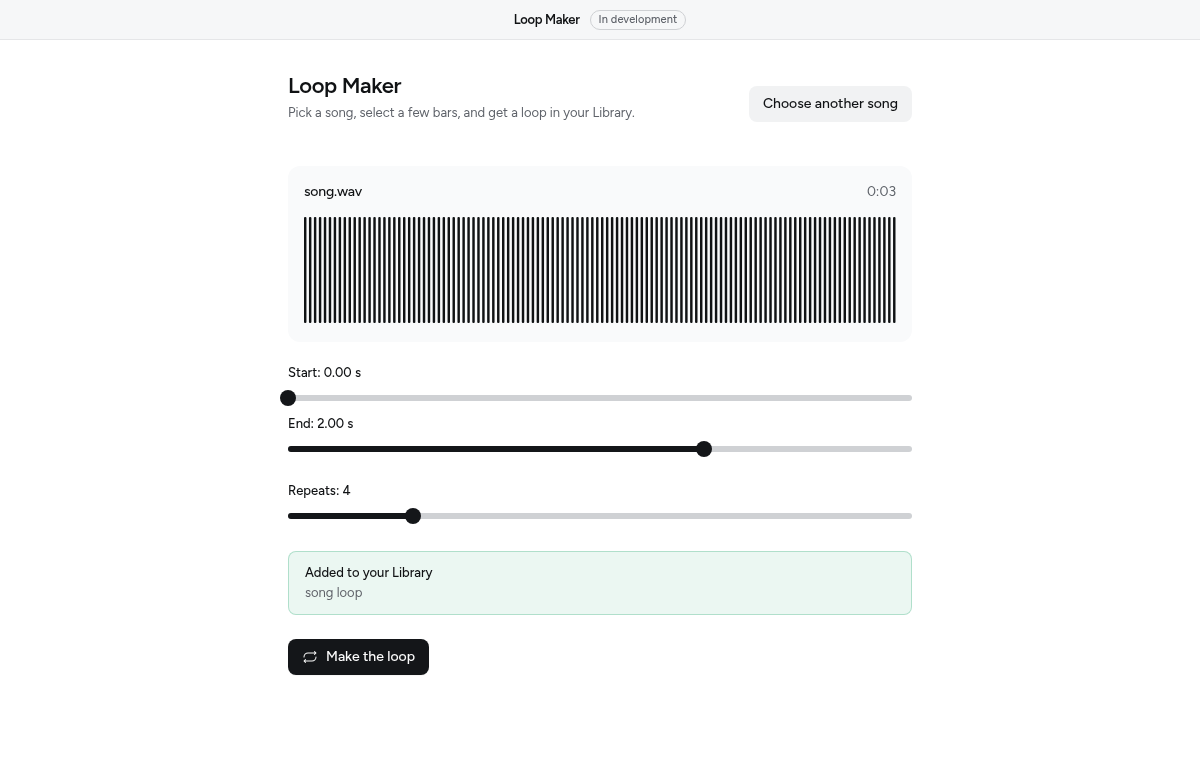
`ox.run(action, input, options)` runs one of your actions the way the form would: in the background, with the input checked against its controls first. This page picks a song, draws it, and makes a loop with the `make_loop` action from `app.py`:
```tsx title="src/App.tsx"
import { useRef, useState } from "react"
import { ox, OxError } from "@ox1audio/sdk/page"
import { Button, Callout, EmptyState, PageHeader, Progress, Waveform, waveformFrom, type Wave } from "@0x1audio/design-system"
export function App() {
const [song, setSong] = useState(null)
const [wave, setWave] = useState(null)
const [progress, setProgress] = useState()
const [message, setMessage] = useState(null)
const stop = useRef(null)
async function choose() {
const [path] = await ox.files.pick({ accept: "audio", multiple: false })
if (!path) return
setSong(path)
setWave(await waveformFrom(await ox.files.read(path)))
}
async function make() {
stop.current = new AbortController()
setProgress(null)
try {
const made = await ox.run<{ items: { title: string }[] }>(
"make_loop",
{ file: song, start: 0, end: 2, repeats: 4 },
{ onProgress: (fraction) => setProgress(fraction), signal: stop.current.signal },
)
setMessage(`Added ${made.items[0].title} to your Library.`)
} catch (error) {
if (!(error instanceof OxError && error.code === "cancelled")) setMessage(String((error as Error).message))
} finally {
setProgress(undefined)
}
}
if (!song) {
return Choose a song} />
}
return (
{message ? {message} : null}
{progress === undefined ? (
) : (
)}
)
}
```
- `onProgress(fraction, label)` gets each `ox.progress` call; `fraction` is `null` while the action can't tell.
- `onEvent(name, body)` gets each `ox.emit` from Python.
- Aborting `signal` presses Stop. The promise rejects with an `OxError` whose `code` is `cancelled`, and `kept` lists what was already in the Library.
- Sounds the action returns come back as `{ items: [{ id, kind, title, path }] }`, already in the Library. A `dict` comes back as it is.
Other failures are `OxError` too, with a `code` from [Errors](https://docs.0x1audio.com/errors.md), like `problem` (from `ox.Problem`, with its `hint`).
To start from the form Mixel draws and build around it, render ``.
## The page API
| Call | Does |
| --- | --- |
| `ox.run(action, input, options)` | Runs an action |
| `ox.actions()` | Lists the actions and their inputs |
| `ox.files.pick({ accept, multiple, folder })`, `fromDrop(file)`, `read(path)`, `reveal(path)` | Files the person chooses or drops (`files`) |
| `ox.library.add / onChange` | Adding to the [Library](https://docs.0x1audio.com/library.md) (`library`) |
| `ox.library.list / file` | Showing the person's sounds, and opening one they pick (`library-read`) |
| `ox.data.list / read / readText / write / remove` | The app's own files (`data`) |
| `ox.app.open(href)` | Opens another page of the app in a new window |
| `ox.available()`, `ox.unavailable()` | Whether the page is open in Mixel. Outside it, `unavailable()` is the `OxError` every call would throw, with a message to show |
Nothing else on the page touches the computer, and `fetch` reaches only the hosts listed under `network`.
## Design
Use only design-system components and colour tokens; review holds pages to this. One filled `Button` per view, for the main thing to do. Design the empty, working, done and error states, and look at the page in light and dark. The [components reference](https://docs.0x1audio.com/reference/components.md) lists what's there, and [Design](https://docs.0x1audio.com/design.md) explains the rules.