Your first app
Install mixel, make a small app that folds songs to mono, test it, and open it in Mixel. About five minutes.
You need two things:
- Mixel on a Mac with macOS 14 or later. Download it.
- uv, which installs
mixeland your app's Python packages.
Nothing else: no Node, and no Python setup of your own. mixel also runs on Linux and Windows, where everything but mixel dev works.
Install mixel
uv tool install ox1audio
mixel doctor
The package is ox1audio; the command it installs is mixel. mixel doctor says what's missing, if anything, and how to fix it.
These pages describe mixel 0.3.5 or later; mixel --version says which you have, and uv tool upgrade ox1audio updates it. To use the SDK in a script of your own, pip install ox1audio works too.
Start an app
mixel new "Make It Mono"
cd make-it-mono
That writes a small app that already passes its checks:
| File | What it's for |
|---|---|
app.py | The actions: the work, as Python functions |
app.json | The name, a one-line summary, and what the app may touch |
AGENTS.md | The whole API, for you and your coding agent |
tests/test_app.py | A test that runs the action on tests/tone.wav |
pyproject.toml | The Python packages the app needs |
Write the action
Replace app.py with this:
import numpy as np

import ox1audio as ox


@ox.action("Make it mono")
def mono(files: ox.Files("audio")):
    made = []
    for i, path in enumerate(files):
        ox.progress(i / len(files), path.name)
        samples, rate = ox.audio.read(path)
        folded = np.mean(samples, axis=1, keepdims=True)
        out = ox.audio.write(folded, rate, "wav", name=f"{path.stem} mono")
        made.append(ox.sound(out, title=f"{path.stem} mono"))
    return made
files: ox.Files("audio")becomes a file picker. Eachpathis apathlib.Path.ox.progressmoves the progress bar, and it's where Stop takes effect.- Each
ox.soundgoes into the person's Library when the action returns.
ox.audio.read hands you the samples as a numpy array, and the app imports numpy, so list it as a package. (mixel check --fix adds it for you.)
[project]
name = "make-it-mono"
version = "0.1.0"
requires-python = ">=3.11"
dependencies = ["numpy"]
uv syncuv sync installs numpy into the app's .venv and writes uv.lock, which pins the exact versions. mixel runs your app with this .venv, and Mixel installs exactly what uv.lock pins for the person, so commit it with the app.
Say what it does
Open app.json and write the words people will read. The summary is what they see in Mixel's Apps section, and each permission's reason appears before the app opens:
{
  "$schema": "https://0x1audio.com/schema/app/v1.json",
  "name": "make-it-mono",
  "displayName": "Make It Mono",
  "summary": "Fold stereo songs down to one channel.",
  "version": "0.1.0",
  "sdk": "^0.3",
  "entry": "app.py",
  "permissions": {
    "files": "Open the songs you choose.",
    "library": "Save the mono copies to your Library."
  },
  "accent": "#20b4c4"
}
Check and test
The test mixel new wrote is for the app it started with, so change it to test your action:
import unittest
from pathlib import Path

import ox1audio as ox

import app

TONE = Path(__file__).with_name("tone.wav")


class MonoTest(unittest.TestCase):
    def test_makes_a_mono_copy(self):
        run = ox.test(app.mono, files=[TONE])
        item = run["items"][0]
        self.assertEqual(item["title"], "tone mono")
        self.assertEqual(ox.audio.probe(item["path"]).channels, 1)


if __name__ == "__main__":
    unittest.main()
Then check the app, run its tests, and run the action once on the test tone:
mixel check
mixel test
mixel run mono --file tests/tone.wav --out /tmp/mono
mixel check applies the rules Mixel and its reviewers use. When something's wrong, it names the file and line, then a fix: line that tells you what to change. mixel run runs one action on a real file and leaves the result in /tmp/mono for you to listen to.
Open it in Mixel
In Mixel, turn on Settings › Developer mode, then quit Mixel and open it again: the switch takes effect the next time it opens. Then:
mixel devThe app opens in Mixel, marked In development. Save app.py and it reloads. Anything it prints, and every error, shows up in your terminal. Press Ctrl-C to close it.
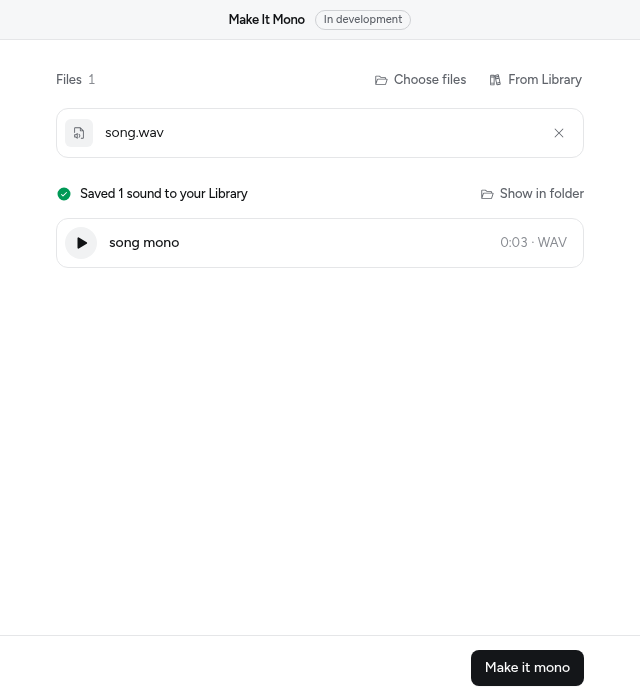
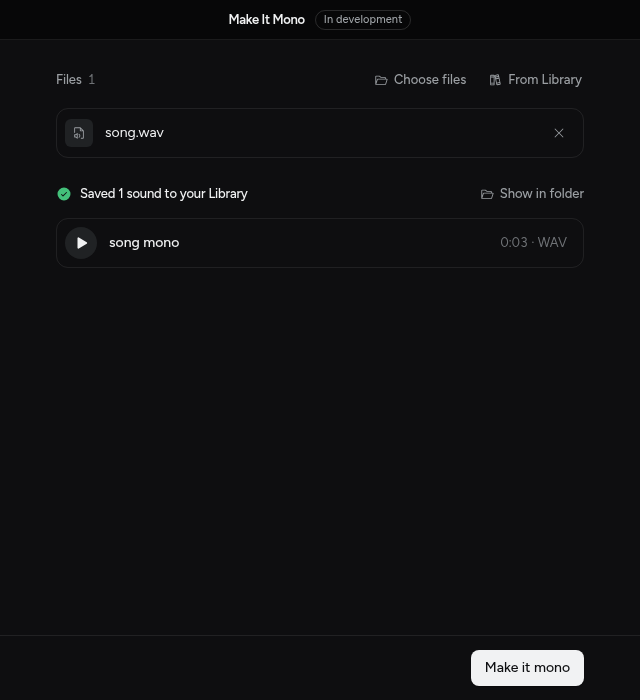
Mixel drew the form from the function: a file picker for files, and a button named after the action. When you want more than a form, add a page.
Next
- Build an app with your agent: the same loop, with Claude Code or Cursor doing the typing.
- Actions: every control, progress and Stop, results, and testing.
- Publish and review: send it for review when it's ready.