Build an app with your agent
From an empty folder to an app in review in about fifteen minutes, with Claude Code or Cursor typing and mixel checking.
You'll build Slicer: it cuts a recording into equal pieces, ready for a sampler, and adds them to your Library. You describe the tool; your agent writes it; mixel checks every step against the rules Mixel's reviewers use.
You need Mixel on a Mac, uv, git, and Claude Code or Cursor.
1. Install mixel
uv tool install ox1audio
mixel doctor
Turn on Settings › Developer mode in Mixel and reopen it, so mixel dev can open your app. Run mixel doctor again: all but sign-in should say ok.
2. Connect your agent
The mixel MCP server gives your agent the loop as tools: check, test, run one action, read a docs section. It runs on your computer and never publishes.
claude mcp add mixel -- mixel mcp3. Start the app
mixel new "Slicer"
cd slicer
Open the slicer folder in your agent. It contains AGENTS.md, which your agent reads first: the whole API and the rules, in under 2k tokens.
4. Describe the tool
Give your agent something like this:
Turn this into Slicer: one action that slices a recording into equal pieces for a sampler. Let me choose one file, the piece length in seconds (from 0.25 to 30, default 2), and whether to fade the edges of each piece. Each piece goes to my Library, named after the file with a two-digit number. If the piece is longer than the recording, tell me so in plain words. Update the test to cover both cases. Use the mixel MCP tools: call start first, and keep calling app_check until it has no errors, then app_test.
What you'll see it do:
- Call
start, then writeapp.pyandtests/test_app.py. - Call
app_check, which saysdependency_missing: the code imports numpy. It adds numpy topyproject.toml(app_checkwithfix: truedoes it) and installs it withuv sync, which also writesuv.lock. - Call
app_checkagain until it reports no errors, thenapp_test, and maybeapp_runon a real file to hear the result.
app.py should end up close to this:
import numpy as np

import ox1audio as ox


@ox.action("Slice into pieces")
def slice_song(
    file: ox.Files("audio", multiple=False),
    seconds: ox.Slider(0.25, 30, 0.25, label="Piece length (seconds)") = 2.0,
    fade: ox.Toggle(label="Fade the edges") = True,
):
    samples, rate = ox.audio.read(file)
    size = int(seconds * rate)
    if size >= len(samples):
        raise ox.Problem(f"{file.name} is shorter than one piece.", hint="Choose a shorter piece length.")
    count = -(-len(samples) // size)
    edge = min(int(rate * 0.005), size // 2)
    ramp = np.linspace(0, 1, edge, dtype=np.float32)[:, None]
    made = []
    for i in range(count):
        ox.progress(i / count, f"Piece {i + 1} of {count}")
        piece = samples[i * size : (i + 1) * size].copy()
        if fade and edge and len(piece) > 2 * edge:
            piece[:edge] *= ramp
            piece[-edge:] *= ramp[::-1]
        name = f"{file.stem} {i + 1:02d}"
        made.append(ox.sound(ox.audio.write(piece, rate, "wav", name=name), title=name))
return madeimport unittest
from pathlib import Path
import ox1audio as ox
import app
TONE = Path(__file__).with_name("tone.wav")
class SliceTest(unittest.TestCase):
def test_slices_a_half_second_tone_into_two(self):
run = ox.test(app.slice_song, file=TONE, seconds=0.25)
self.assertEqual([item["title"] for item in run["items"]], ["tone 01", "tone 02"])
def test_a_piece_longer_than_the_song_is_a_problem(self):
with self.assertRaises(ox.Problem):
ox.test(app.slice_song, file=TONE, seconds=10)
if __name__ == "__main__":
unittest.main()If your agent writes something different that passes app_check and app_test, that's fine. Read it anyway: it's your app.
5. Try it in Mixel
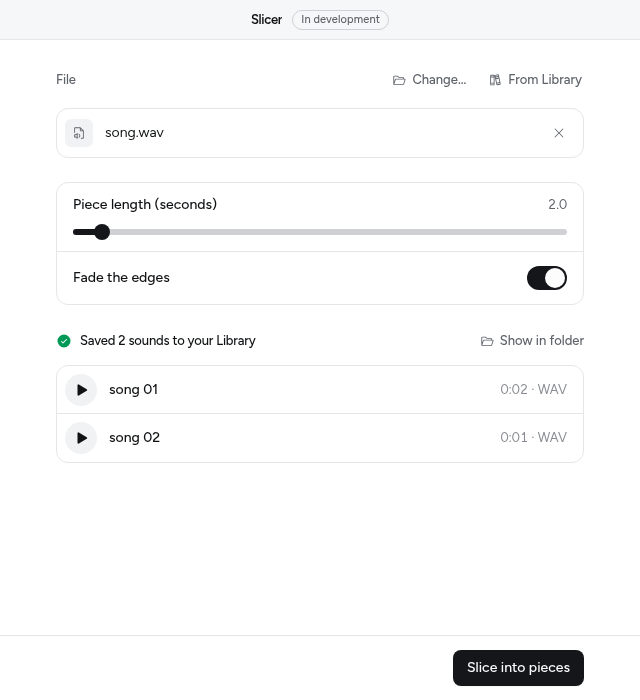
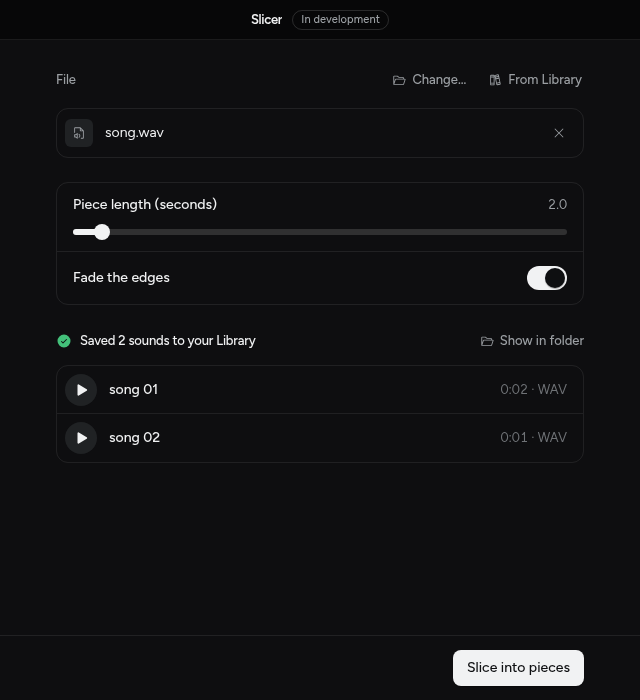
mixel devSlicer opens in Mixel, marked In development. Choose a recording, press Slice into pieces, and the pieces appear in your Library. Leave mixel dev running while you ask your agent for changes: it reloads on every save and prints the app's log and errors in your terminal.
6. Say what it does
The words in app.json are what people read in Mixel's Apps section and before the app opens. Write them yourself, or ask your agent and then read them:
{
  "$schema": "https://0x1audio.com/schema/app/v1.json",
  "name": "slicer",
  "displayName": "Slicer",
  "summary": "Slice a recording into equal pieces for your sampler.",
  "version": "0.1.0",
  "sdk": "^0.3",
  "entry": "app.py",
  "permissions": {
    "files": "Open the recording you choose.",
    "library": "Add the pieces to your Library."
  },
  "accent": "#e0368f"
}
7. Check it and send it for review
mixel check --strict
mixel test
uv lock
--strict is what publishing requires: no errors and no warnings. uv lock pins numpy to the version you tested, so Mixel installs exactly that.
Reviewers read the code on GitHub, so give Slicer its own public repository and push it:
git init
git add -A
git commit -m "Slicer 0.1.0"
git remote add origin https://github.com/you/slicer.git
git push -u origin main
Then sign in and publish. Try a dry run first; it does everything except send:
mixel login
mixel publish --dry-run
mixel publish
Checks passed
Git main at 7e8309c, pushed to github.com/you/slicer
Version 0.1.0
Dry run: nothing was sent. Run mixel publish to submit it for review.mixel status shows where your version is and any notes from a reviewer. See Publish and review for what they look at.
If something goes wrong
| You see | Do this |
|---|---|
desktop_unavailable from mixel dev | Turn on Settings › Developer mode, then reopen Mixel |
dependency_not_installed | uv sync (app_check with fix: true runs it) |
permission_reason with a TODO | Write the reason in app.json in your own words |
git_not_pushed from mixel publish | git push |
lock_missing from the registry | uv lock, then commit uv.lock and push |
Every code is in Errors. The fix: line under each one is the answer.
Next
- A custom page when the drawn form isn't enough.
- Actions for every control, and for progress and Stop.
- MCP for coding agents for every tool your agent can call.